
• Paperless reports
  • Works without internet
  • On-premise or cloud
  • Ask AI about your data

Record any field work without paper,
with an AI assistant to help

Digiform replaces paper forms and spreadsheets in the field. Inspectors fill them in on a phone or tablet, reports put themselves together, and managers see today's conditions without waiting for the end-of-month recap.

Built forManufacturing, hospitals, construction, fleets
Start fromYour existing paper or Excel forms
What you getPDF and Excel reports, live dashboards
Sample templates ready to load20+
InstallationOn-premise or cloud
LicenseOne-time purchase or subscription

Works with the tools you already use

  • Excel and CSV
  • PDF
  • Email
  • WhatsApp
  • REST API
  • QR scan

01Why switch

Fill the form once, nobody re-types it afterwards

In many workplaces, forms are still filled in on paper, copied into Excel, and recapped for hours before they reach a manager's desk. Problems found in the field surface days later, and a lost sheet is gone for good.

With Digiform, data is recorded once, on site. Reports and dashboards are built from that data, findings go to the person responsible right away, and the full history is kept in order for audits.

Worker filling in a paper checklist on a clipboard between plant tanks
The same kind of check as a digital form on a phone

02What you gain

Three jobs your team can stop doing

The three jobs that take up the most time for field teams and the office.

Supervisor in a helmet and safety vest writing on a paper form on a clipboard in a plant

Switch from paper and Excel without changing how your team works

The forms your team already knows move over as they are: from Excel files, from ready-made sample forms, or from a photo of the paper form. The layout stays the same, so people in the field understand it right away without long training.

  1. Import straight from the Excel files you already use
  2. Photograph a paper form and its digital draft is laid out for you
  3. 20+ sample forms ready to load for different sectors

Warehouse worker reading a tablet while scanning stock on a rack of drums

Inspectors fill forms faster, with fewer mistakes

Each kind of data has its own input: choices, numbers with limits, photos, signatures, and QR scans. Out-of-range values are flagged as they are entered, required fields cannot be skipped, and everything keeps working on sites with no internet.

  • No more handwriting nobody can read
  • Photo evidence, location, and time are recorded automatically
  • Entries send themselves once the connection is back
Two office staff looking at a monitor together, smiling
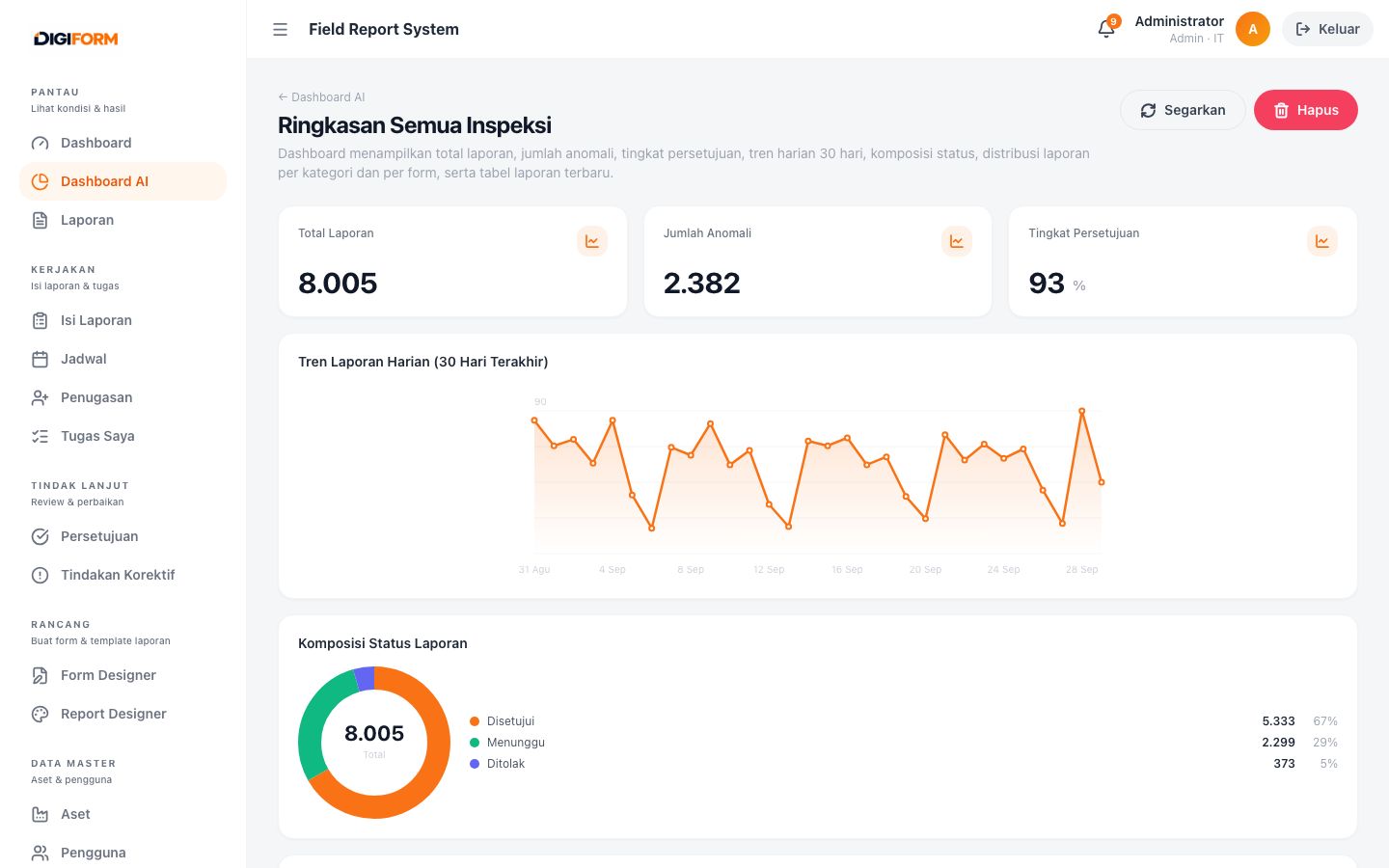
Digiform inspection summary dashboard with daily trend and report status

Reports build themselves, managers see today's conditions

No more copying into Excel or assembling monthly reports by hand. PDF and Excel reports come out of one template and go out by email on a schedule, while dashboards show trends and findings without waiting for a recap.

  • Daily to monthly reports with no manual recap
  • Findings go straight to the person responsible
  • Supervisors approve from a phone or computer

What you get

  • Faster decisionsField conditions are visible the same day, not after the end-of-month recap.
  • Findings that get acted onOut-of-range values go to the person responsible, with a due date and status.
  • Ready for auditsEvery entry, change, and approval is recorded with who did it and when.
  • Archives without cabinetsReports are stored digitally and can be searched anytime, with no storage room and no lost sheets.

03Your industry

What this looks like in your sector

The problems we see most often in each sector, and what changes once the forms move to Digiform.

Textile factory operator checking threads on a spinning machine

Manufacturing

Machine checksheets without re-typing

The challenge

Shift checksheets are filled in on paper and copied into Excel. Values past their limits often only show up in the monthly recap.

What changes

  • Out-of-range values are flagged on entry and the supervisor is notified
  • Monthly recaps build themselves in PDF and Excel
  • Each machine's history is easy to trace during quality audits
Medical staff in a mask and protective gown checking forms while holding a tablet

Hospitals

Facility checks that get followed up quickly

The challenge

Daily check results are only written in a logbook, so it is hard to tell whether damage or problems have been dealt with.

What changes

  • Photo evidence for every room and floor
  • Risky findings become corrective actions with an owner and a due date
  • Full history available whenever an audit needs it
Site engineer in a helmet and safety vest using a tablet in front of a steel frame

Construction and safety

Safety inspections in areas with no internet

The challenge

Project sites often have no network, so inspection reports are handwritten and only typed up back at the office.

What changes

  • Forms can be filled offline and send once there is a connection
  • Location and time are recorded as evidence
  • Compliance scores per area show up on the dashboard
Mechanic crouching by a truck wheel while filling in an inspection sheet

Fleet and assets

Vehicle checks recorded per unit

The challenge

Vehicle conditions are noted on loose sheets, so each unit's history is hard to pull together when a repair is needed.

What changes

  • Scanning the QR code on a vehicle opens the right form
  • Damage photos become the basis for repair requests
  • Inspection history and service schedule per unit

04See it in action

The same app on phone, tablet, and computer

Screenshots taken straight from Digiform with its built-in sample data. The app interface is currently in Indonesian.

Inspection summary dashboard on a computer: total reports, anomalies, approval rate, a 30-day daily trend, and report status breakdown
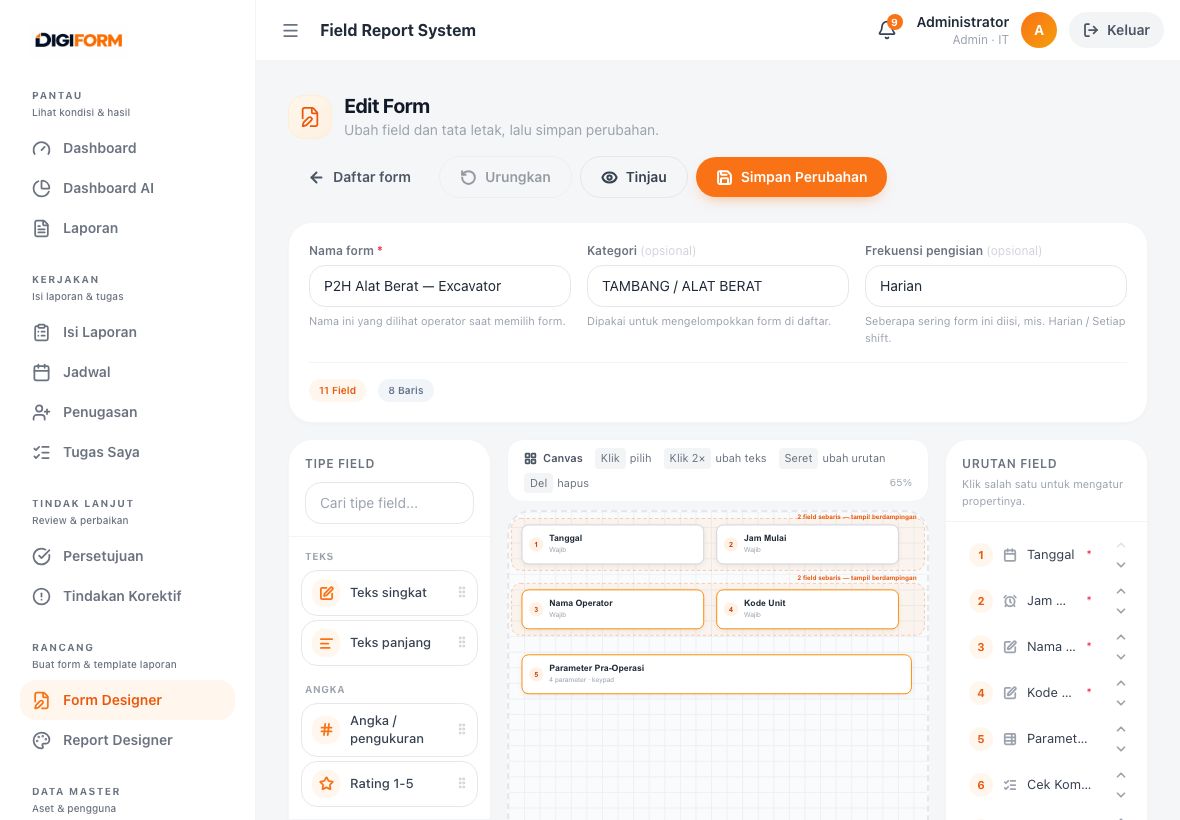
Form designer on a tablet: the P2H heavy equipment form laid out on the canvas
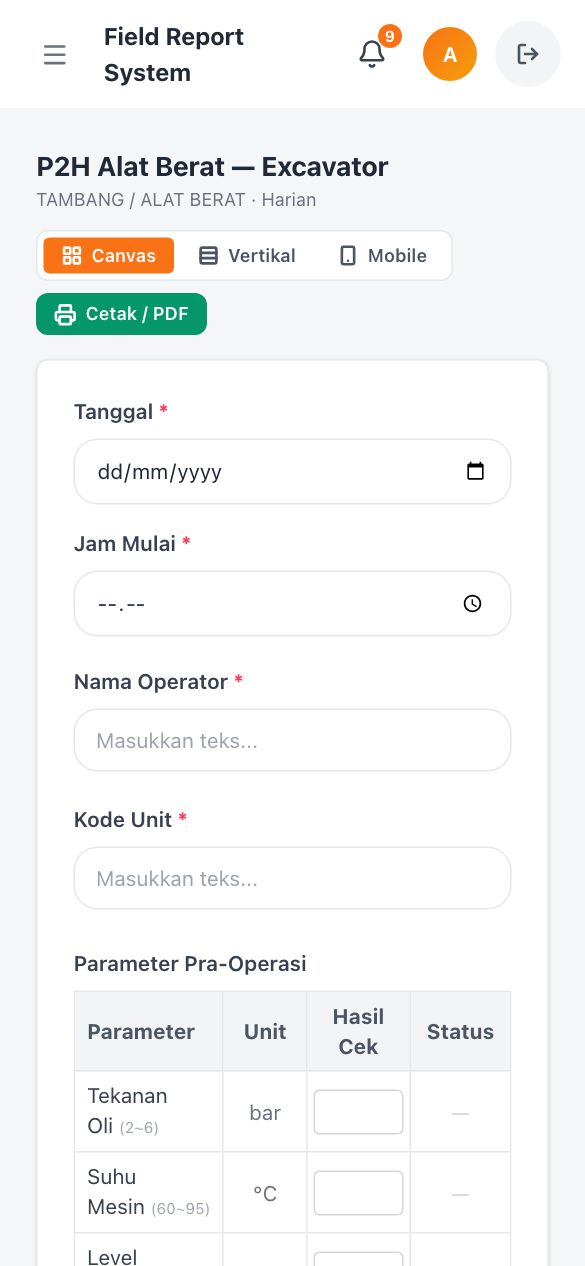
Filling the P2H heavy equipment form on a phone: date, operator, unit code, and a pre-operation parameter table
  • ComputerDashboard with the daily trend, anomalies, and approval status
  • TabletForm designer: fields dragged onto the canvas
  • PhoneFilling on site, including parameter tables

05Your forms

What kinds of paper forms you can move

Start from 20+ sample forms ready to load, or build your own with 23 input types: numbers, choices, photos, signatures, GPS, QR scans, and parameter tables.

  1. 01Daily machine checksheet
  2. 02Daily production report
  3. 03Quality inspection (QC)
  4. 04Incoming goods inspection
  5. 05Pre-shipment inspection
  6. 06Warehouse stock count
  7. 07Safety patrol and inspection
  8. 08Work permit
  9. 09Vehicle pre-use check
  10. 10Unit handover
  11. 11Hygiene and cleanliness audit
  12. 12Hospital facility checks
  13. 13Incident report
  14. 14Utility meter reading
  15. 15Lift, generator, and AC maintenance
  16. 16Supplier visit and audit

06How it works

Four steps from paper form to decision

This flow fits almost every routine inspection, whether daily, weekly, or monthly.

NoStepWhat happens
01

Build the form

Start from a built-in template, import from an Excel file, or upload a photo of a paper form to rebuild it.
02

Set assignments

Choose who fills it in, which assets are inspected, and how often the inspection repeats.
03

Fill on site

Inspectors fill it from their phones: photos, signatures, GPS points, and QR scans, even without a connection.
04

Review and publish

Findings are flagged, dashboards update, and reports are sent to the people who need them.

07One platform

Everything included, nothing sold separately

No module is sold separately, and no extra app is needed.

This table is wider than the screen. Swipe sideways to see the other columns.

NoModuleDetails
01

Form Builder

Rebuild paper forms in digital form. Drag fields onto the canvas, group them into sections, and save the result as a template the whole team can reuse.

  • 23 field types, from text, numbers, parameter tables, photos, signatures, GPS, and QR scans to sensor data
  • Validation rules, minimum and maximum limits, and calculated fields that pull values from other fields
  • Import form structure from the Excel files you already use
  • Snap-to-Form: upload a photo of a paper form and the system drafts its fields for you to tidy up
02

Offline Filling

Filling keeps going when the network drops. Digiform can be added to a phone's home screen like a regular app. Form definitions are stored on the device, submissions wait in a queue, and they send automatically once the network is back.

  • Every form can be opened while the device is offline
  • Photos and signatures are kept in the send queue too
  • Network status and the number of unsent drafts are shown on the filling screen
  • Stays light to use at sites with unstable connections
03

Report Builder

Reports in the format your manager asks for. You lay out the report yourself: header, data tables, number summaries, charts, photo attachments, and signature blocks. The result can be printed or exported right away.

  • Report blocks for titles, data tables, statistical summaries, charts, and photo galleries
  • Print-ready preview with its own page settings
  • Export to PDF, Excel, and CSV from the same template
  • Reports emailed automatically on the schedule you set
04

Dashboards and Analysis

Data summaries without manual recaps. Every submission goes straight into the daily summary. Values past their limits are flagged, and questions about the data can be asked in plain sentences.

  • Minimum, maximum, and average values, plus trends per period
  • Automatic flags for values outside the limits you set
  • Analog meter readings taken from submitted photos
  • The AI engine can run on your own server, so data never leaves your network
05

Approvals

Findings get acted on instead of ending up as notes. Every report goes through review. Out-of-range findings can be turned straight into a corrective action request with an owner and a due date.

  • Supervisor review with three decisions: approve, reject, or send back for fixes
  • Corrective action requests with status, owner, and due date
  • Email and WhatsApp notifications for new submissions, findings, and approval requests
  • An audit trail that records every change, who made it, and when

08Features

What field teams use every day

Designed around real working conditions: many inspectors, separate sites, limited connectivity, and reports that still have to be tidy.

Form builder

Build nested forms, parameter tables, and calculations without writing code.

Offline filling

Reports can still be filled in warehouses, mine sites, or basements.

Excel import and Snap-to-Form

Bring existing forms over from spreadsheet files or from photos of paper forms.

Analysis and anomaly flags

Period summaries, value trends, meter readings from photos, and questions about your data.

Reports and exports

Print-ready PDF files, Excel for further work, and CSV for other systems.

Notifications

Email and WhatsApp for new submissions, out-of-range findings, and approval requests.

Assets, QR, and assignments

Stick a QR code on a machine, then scan it to open the right form along with its history.

User roles and audit trail

Four roles with their own access rights, and every data change is recorded.

09AI Assistant

What the AI helps you do

Four jobs with clear limits, not an assistant that tries to do everything. All of them are optional, and every step still has a manual path.

Illustration that cycles through five examples: drafting a generator check form, drafting a safety inspection form, building a dashboard of inspections per site, reading a pressure gauge from a photo, and answering a question from your own records.

An illustration of how the prompt works. The screens are still being built, so the real ones may look different, and the examples above are examples, not results from anybody’s data. Whatever the AI drafts, the numbers are always computed from your own records.

Drafting forms from text or Excel

Paste a list of parameters or upload a spreadsheet, and the form skeleton is laid out for you to tidy up. Excel columns that are already well structured are read directly, with no AI involved at all.

Reading meters from photos

A photo of a meter needle or gauge becomes a number. It lands in the field as a suggestion, and the inspector still checks it and can correct it before saving.

Building dashboards from plain sentences

Say what you want to see and the widget layout is built for you. The numbers are always calculated from your own data, never made up, and when part of a request cannot be calculated, the system tells you which part.

Answering questions about your data

Questions are answered only from what is in your system. When the answer is not there, it says so plainly instead of guessing.

Can be switched off completely

Without an AI key, all four jobs fall back to their manual path and the rest of the app does not change at all. AI here is an extra, not a requirement.

Can run inside your network

The AI engine can point to a server you own, so nothing has to leave your internal network.

10Integrations

Works with the tools you already use

Field data does not stop at Digiform. It can be integrated with a variety of systems, including databases such as Oracle and PostgreSQL, through the REST API, webhooks, or scheduled exports.

  1. 01Excel and CSV
  2. 02PDF
  3. 03Email
  4. 04WhatsApp
  5. 05REST API
  6. 06QR scan
  7. 07Webhook
  8. 08Scheduled exports

11Data stays yours

Field data stays in your environment

Digiform can run entirely on your own infrastructure, analysis engine included, so inspection data never has to leave your internal network.

On-premise or cloud

Install it on your own servers, or use the cloud if you would rather not run a server yourself.

Roles and permissions

Four user roles, each with its own access to every menu.

Audit trail

Every change is recorded along with who made it and when.

Local analysis

AI can run entirely inside your network when data must not leave it.

Digiform runs on a standard server and only needs a browser on a phone, tablet, or computer. Our team handles the installation.

12Plans

Start with one team, grow as you need

Every plan uses the same product. The difference is how widely it is used, what integrations you need, and how much hands-on support you get.

This table is wider than the screen. Swipe sideways to see the other columns.

Capability Self-serve trialEvaluation and a pilot with one team Best fit for daily operationsTeamDaily use across several sites EnterpriseIntegration and compliance needs
All field types and built-in templatesincludedincludedincluded
Filling reports while offlineincludedincludedincluded
PDF, Excel, and CSV exportincludedincludedincluded
On-premise or cloud installationincludedincludedincluded
Approval flow and corrective actionnot includedincludedincluded
Analysis dashboards and anomaly flagsnot includedincludedincluded
Email and WhatsApp notificationsnot includedincludedincluded
Scheduled recurring reportsnot includedincludedincluded
Integration with ERP, reporting systems, or IoT gatewaysnot includednot includedincluded
Analysis with local models on your own networknot includednot includedincluded
Rollout support and user trainingnot includednot includedincluded
Open Dashboard Contact us Discuss your needs

Prices are not listed here because they depend on three things: how many people will use it, how many sites are involved, and which integrations you need. Tell us those three and a quote follows.

13FAQ

Frequently asked questions

Did not find your answer? Send us your question

Is our form data sent to an outside AI service?
Only if you turn the AI features on, and only as much as each job needs: just the meter photo for meter reading, and counts plus inspection metadata for data questions, never the whole database. Dashboard building only sees the list of forms and their column names, not the entries. If even that is not acceptable, the AI engine can point to your own server so nothing leaves your internal network. Without an AI key, every AI feature is off and the app still runs in full. See what each job does
Does the app really work without a network?
Yes. Form definitions are stored on the device, so forms can still be opened and filled while offline, including taking photos and signatures. Entries go into a queue on the device and send automatically once the network is available. A connection is only needed for the first sign-in and while syncing.
Can we move our paper forms over without rebuilding them from scratch?
There are three ways: import from an Excel file, adapt the closest built-in template, or use Snap-to-Form, where you upload a photo of the paper form and the system drafts its fields. You then just check and tidy the draft before using it.
Where is our inspection data stored?
You choose. With an on-premise installation, Digiform runs on your infrastructure, so all inspection data stays inside your internal network. With the cloud option, you do not need to prepare a server of your own. Its AI features can also run entirely on your server when data must not be processed by a third party.
Do field inspectors need special training?
Not for filling in reports. The filling order follows the paper forms they already use, with large buttons that stay comfortable to use while standing or wearing gloves. Short training is usually only needed for form builders and the supervisors who review reports.
What does the final report look like?
You design the layout yourself in the report builder: header, data tables, statistical summaries, charts, photo galleries, and signature blocks. The result can be printed, exported to PDF, Excel, or CSV, and emailed on a schedule.
Can Digiform connect to the systems we already run?
Yes. There is a REST API for forms, submissions, and reports, plus scheduled file exports for ERP or management reporting. For more specific needs, integrations are built together with you on the Enterprise plan.

Start using Digiform

Open the dashboard to try the whole flow: build a form, fill it from a phone, then publish your first report.

For help with installation, form setup, and user training, contact the system administrator at your organization.